I have just switched my job in Jan 2011 in Norway. This experience which is very fresh in my head which I will describe here.
Big firms in Norway hire head hunters and outsource their recruitment process and try to recruit best candidates in the market.While small firms who can't afford headhunters execute hiring process by themselves.
You can directly apply to jobs online on the company websites or through head hunting firms. But don't try to apply same job by yourself as well as through headhunter.
Most famous Job Site in Norway is finn.no. You can create your own profile on the website and expose it to the recruiters also start applying for jobs online. There is possibility of setting your own agent on finn.no which could send you automatically jobs when they published on website which match your search criteria.
Each job specification on finn.no is mostly given in very details and unfortunately in norwegian. So you need to use google translator to translate the job description in to english. Companies having their internal business language as English publish their job requirement in english to appeal wide range of people. The job description also contains the contact person for the job.Feel free to contact this person. They would be very nice to entertain you. You can ask them questions regarding job descriptions and things if not clear to you about job.
Almost all Norwegian employers are looking for their employees from different backgrounds like culture and ethnicity.
As mentioned above there are some companies in Norway who has business language as English.Mostly are MNCs which are doing business abroad as well as in Norway. Lots of consulting companies do business both in english and norwegian.
Mostly all Norwegians know English very well and they are very cooperative ,have very good work ethics ,good team players as well as down to earth people. Mostly workplace are very mature because avg. age of the people is around 35.
You need to give a 3 months’ notice to your current employer. This is common in all Norway. But you can have different arrangement with your current employer.It depends.
CV and Covering Letter
You need prepare a CV and covering letter.
Covering letter consists of
1. Your brief experience summery
2. Your motivation for applying the job.
3. Why you are suitable for this job.
4. Your proficiency about Norwegian language. I would emphasize the you must learn Norwegian language if you want to work in Norway. No escape from this rule :)
CV must contain:
1. Descrption about skills
2. Your experience
3 Your birth date
4 nationality
5 Contact details and mobile number
6. Work permit status if any
General Interview procedure
1. Personal Interview (Mostly with headhunter).
He tries to gauge your personality and personal questions, family related questions, salary expectations and he tries if you fit in the position as well as culture of the company.
2. If headhunter likes you he recommends your CV to the employer. Then employer shortlists the CVs
3. The headhunter arranges your interview with head of the department of your prospected employer.
3. Then interview happens either technical (for techies) or related your domain.
4. If you pass all these interviews then head hunter asks for references. These references could be from your current employer or previous employer in Norway.
5. There is a possibility that you can have another interview with headhunter or department head. This could be a final interview wherepossibility that you negotiate salary exists. In parallel reference checks are done by headhunter or department head.
Keep ready two references mostly from your current or previous job. Once your prospect employer asks for reference there is certainty that you will get a job. References are mostly expected to be your Norwegian colleagues.
Being social with Norwegians helps very much to get references as well as to find jobs. What I understand from the process that reference check is taken very seriously.
Headhunters call the references and try to do a background check on you. They ask lots of questions regarding your work ethics, you style at work, and personality etc and they try to cross check this with what you said in the interview. So it’s better not to hide anything....
Dress code is formal during the interview and you can prefer English if you don't know Norwegian. You can mention that in your covering letter.
If there is multiple job interview processes are going on with different companies you can say so. You can also ask them to take a decision as early as possible.
Better policy is to be honest in the interview. You are not expected to know all the things in your domain. You need to confidentin the interview. If you don't understand any question then you can ask him to repeat.
Learning Norwegian is very important in Norway because that shows that you are interested in getting accustomed to Norwegian culture. There are lots of Norwegian language courses available in Oslo. That’s a best start to learn Norwegian. On top of that it’s a onetime investment. Once you know language you know it for lifetime.
Best of luck for your next job hunting in Norway......
Friday, January 21, 2011


Thursday, December 9, 2010
Migrating Deployment Manager to other machine.
1 This document outlines necessary steps to migrate the Network Deployment manager (DMGR profile) from one machine to another.
2 The main assumptions before describing the steps are:
3 The IP address of the machine is not referred in any of the configuration or applications.
4 The host name is not hard coded in applications.
5 This document assumes that the new cell installed will have the same “cellname” and ”nodename” value of the source server.
6 Ideal Operating System Platform for DMGR and other server nodes.
7 Identical fix pack levels for source and target servers.
8 The node name at the current environment will not be changed at the time of migration.
9 The cell is not serving the request and it is forcefully made down.
Steps are:
10 Target DMGR Machine:
11 Check for free space. If not create some space to accommodate the compress file containing the DMGR profile catalog.
12 Source DMGR Machine.
13 Check for the empty space on source DMGR Machine.
14 Create a compressed copy of DMGR profile (either tar or zip).
15 Copy the compressed file on target machine.
16 Check the integrity of the zip file copied on the target machine.
17 Get a screen image of the admin console of DMGR for server panel applications panel and SI Bus if existing.
Target DMGR Machine :
18 Unzip the DMGR profile copied from source machine to profiles directory.
19 Make all configuration changes through the deployment manager profile in an ND environment.
20 In the "serverindex.xml" file for the node profile being modified, alter the value of the
21 “hostName” property for the “ServerIndex.xml” element in the file. Search for string “hostName=” to find this property. Also in the “serverindex.xml” file for the node profile being modified, alter the host property for every “EndPoint” in the file. Search all occurrences of “host=” string in following “serverindex.xml” <WAS_DMGR_PROFILE_HOME>/config/cells/<cell>/nodes/<node>/serverindex.xml
22 Compare the “serveridex.xml” files of the Deployment manager and local WAS server node for port conflicts under <WAS_DMGR_PROFILE_HOME>/config/cells/<cell>/nodes.
23 If port conflict occurs please change the ports for was server node in the <WAS_DMGR_PROFILE_HOME>/config/cells/<cell>/nodes/<node>/serverindex.xml
Remark: Keep common know port of deployment manager (9060,8879,9043) as it is.
24 Source DMGR Machine.
25 Stop the source DMGR node.
26 Remove the execute permissions for startmanager.sh script.
Target DMGR Machine.
27 SU to user who is required to start the dmgr like “was”
28 Start the new DMGR server with “startmanager.sh”.
29 check for logs if problems found in start.
Server Nodes :
30 Wsadmin utility in every node of the Cell should connect to ND; make sure ND host is specified for com.ibm.ws.scripting.host in the wsadmin.properties file.
31 <WAS_NODE_PROFILE_HOME>/properties/wsadmin.properties
32 Delete the content of the following sub-directories entirely.
33 <WAS_NODE_PROFILE_HOME>/wstemp
34 <WAS_NODE_PROFILE_HOME>/config/temp
35 After all documents for the node have been updated in DMGR profile configuration, execute the syncNode tool on each node in the cell containing the node being modified. SyncNode will replicate the configuration containing the changed "hostName" property to the local node profile. Once "syncNode" has been executed, the node should be functional again within the cell, with a new "hostName" property.
36 <WAS_NODE_PROFILE_HOME>/bin/syncNode (.bat/.sh) <DMGR_host> <DMGR_soap_port> -username <name> -password <password>
37 Note:”syncNode” command may take substantial time based on the size of the Cell, so give enough time to complete.
38 Start node agent by following command and verify that node agent is visible in the ND
39 Administrative Console. <WAS_NODE_PROFILE_HOME>/bin/startNode (.bat/.sh)
40 Start each server on node profile by following command.
41 <WAS_NODE_PROFILE_HOME>/bin/startServer (.bat/.sh) <server>
42 Start the node agents on the other servers
43 Start all the clusters
44 The exercise is said to fine only once the all the desired application servers are up and running.
Back Up Plan:
45 Failure to achieve desired result as mentioned in step 27 the backup plan is as follows :
46 Stop the DMGR on target server.
47 Start the DMGR on source servers.
48 Delete the content of the following sub-directories entirely.
<WAS_NODE_PROFILE_HOME>/wstemp and <WAS_NODE_PROFILE_HOME>/config/temp
49 Synchronize all the nodes with the source DMGR with “syncnode” command.
50 Start node agents.
51 Start clusters.
2 The main assumptions before describing the steps are:
3 The IP address of the machine is not referred in any of the configuration or applications.
4 The host name is not hard coded in applications.
5 This document assumes that the new cell installed will have the same “cellname” and ”nodename” value of the source server.
6 Ideal Operating System Platform for DMGR and other server nodes.
7 Identical fix pack levels for source and target servers.
8 The node name at the current environment will not be changed at the time of migration.
9 The cell is not serving the request and it is forcefully made down.
Steps are:
10 Target DMGR Machine:
11 Check for free space. If not create some space to accommodate the compress file containing the DMGR profile catalog.
12 Source DMGR Machine.
13 Check for the empty space on source DMGR Machine.
14 Create a compressed copy of DMGR profile (either tar or zip).
15 Copy the compressed file on target machine.
16 Check the integrity of the zip file copied on the target machine.
17 Get a screen image of the admin console of DMGR for server panel applications panel and SI Bus if existing.
Target DMGR Machine :
18 Unzip the DMGR profile copied from source machine to profiles directory.
19 Make all configuration changes through the deployment manager profile in an ND environment.
20 In the "serverindex.xml" file for the node profile being modified, alter the value of the
21 “hostName” property for the “ServerIndex.xml” element in the file. Search for string “hostName=” to find this property. Also in the “serverindex.xml” file for the node profile being modified, alter the host property for every “EndPoint” in the file. Search all occurrences of “host=” string in following “serverindex.xml” <WAS_DMGR_PROFILE_HOME>/config/cells/<cell>/nodes/<node>/serverindex.xml
22 Compare the “serveridex.xml” files of the Deployment manager and local WAS server node for port conflicts under <WAS_DMGR_PROFILE_HOME>/config/cells/<cell>/nodes.
23 If port conflict occurs please change the ports for was server node in the <WAS_DMGR_PROFILE_HOME>/config/cells/<cell>/nodes/<node>/serverindex.xml
Remark: Keep common know port of deployment manager (9060,8879,9043) as it is.
24 Source DMGR Machine.
25 Stop the source DMGR node.
26 Remove the execute permissions for startmanager.sh script.
Target DMGR Machine.
27 SU to user who is required to start the dmgr like “was”
28 Start the new DMGR server with “startmanager.sh”.
29 check for logs if problems found in start.
Server Nodes :
30 Wsadmin utility in every node of the Cell should connect to ND; make sure ND host is specified for com.ibm.ws.scripting.host in the wsadmin.properties file.
31 <WAS_NODE_PROFILE_HOME>/properties/wsadmin.properties
32 Delete the content of the following sub-directories entirely.
33 <WAS_NODE_PROFILE_HOME>/wstemp
34 <WAS_NODE_PROFILE_HOME>/config/temp
35 After all documents for the node have been updated in DMGR profile configuration, execute the syncNode tool on each node in the cell containing the node being modified. SyncNode will replicate the configuration containing the changed "hostName" property to the local node profile. Once "syncNode" has been executed, the node should be functional again within the cell, with a new "hostName" property.
36 <WAS_NODE_PROFILE_HOME>/bin/syncNode (.bat/.sh) <DMGR_host> <DMGR_soap_port> -username <name> -password <password>
37 Note:”syncNode” command may take substantial time based on the size of the Cell, so give enough time to complete.
38 Start node agent by following command and verify that node agent is visible in the ND
39 Administrative Console. <WAS_NODE_PROFILE_HOME>/bin/startNode (.bat/.sh)
40 Start each server on node profile by following command.
41 <WAS_NODE_PROFILE_HOME>/bin/startServer (.bat/.sh) <server>
42 Start the node agents on the other servers
43 Start all the clusters
44 The exercise is said to fine only once the all the desired application servers are up and running.
Back Up Plan:
45 Failure to achieve desired result as mentioned in step 27 the backup plan is as follows :
46 Stop the DMGR on target server.
47 Start the DMGR on source servers.
48 Delete the content of the following sub-directories entirely.
<WAS_NODE_PROFILE_HOME>/wstemp and <WAS_NODE_PROFILE_HOME>/config/temp
49 Synchronize all the nodes with the source DMGR with “syncnode” command.
50 Start node agents.
51 Start clusters.
Tuesday, October 5, 2010
Best Sayings
"Character is the ability to carry out a good resolution long after the excitement of the moment has passed."
-- Cavett Robert
-- Cavett Robert
Saturday, September 4, 2010
Geeks and Product Experts
Beware of Geeks and their expretise. They have too much bias towards their technology or methodology they know. Most of them don't have sense of how the real business world works.
Saturday, July 24, 2010
solution for compilation error problem with JDK 1.5 com.sun.tools.javac.code.Symbol$CompletionFailure
Hello ,
I was trying build application to used on JBOss using maven 2. Application involves lots of dependencies
while building application with maven 2 ,build was giving following errror.
After spending lots of hours searching on internet as well as trial and error I found a workaround.
1. Locate the jar file which contains this class. In my case it was jboss-jaxws-4.2.1.jar
2. Copy the jar file to following path $JDK1.5 path\jre\lib\ext
Compilation should be successful now.
I know this is not a elegant solution but it works
I was trying build application to used on JBOss using maven 2. Application involves lots of dependencies
while building application with maven 2 ,build was giving following errror.
[INFO] Compilation failure
Failure executing javac, but could not parse the error:
An exception has occurred in the compiler (1.5.0_15). Please file a bug at the Java Developer Connection (http://java.sun.com/webapps/bugreport) after checking the Bug Parade for duplicates. Include
your program and the following diagnostic in your report. Thank you.
com.sun.tools.javac.code.Symbol$CompletionFailure: file javax\jws\WebService.class not found
After spending lots of hours searching on internet as well as trial and error I found a workaround.
1. Locate the jar file which contains this class. In my case it was jboss-jaxws-4.2.1.jar
2. Copy the jar file to following path $JDK1.5 path\jre\lib\ext
Compilation should be successful now.
I know this is not a elegant solution but it works
Tuesday, May 25, 2010
Role and Responsibilities of the Architect
Capture the information from stakeholders. I used to be fan of paper notepads earlier. Now a days I am using either word or PowerPoint to capture the information to avoid repatation of typing.
document it correctly
model it
keep track of the changes
document it correctly
model it
keep track of the changes
Improve Software Quality
I had got a privilege to attend a software code quality seminar. Few points I would
Like to ponder in future are
1. As line of code increases the maintain ace risk for project increases as well as probability of cost overhead.
2. Change management is very important aspect of big budget projects.
There could be 3 criteria for highly successful projects
1. Achieve the quality targets for the customer
2. Achieve revenue targets
3. Achieve the launch date targets
Model Driven design and analysis is very preferable than document based because of visual advantage
My next goal will be look at some static analysis tool
Like to ponder in future are
1. As line of code increases the maintain ace risk for project increases as well as probability of cost overhead.
2. Change management is very important aspect of big budget projects.
There could be 3 criteria for highly successful projects
1. Achieve the quality targets for the customer
2. Achieve revenue targets
3. Achieve the launch date targets
Model Driven design and analysis is very preferable than document based because of visual advantage
My next goal will be look at some static analysis tool
Sunday, March 21, 2010
Developing Projects with Spring
Last week I was released from a project developed in .Net technology. By heart I am a java developer but this was my first green field project in .Net. Our technical team leader was really great in developing his craft and we learned a lot in this project.
Project used spring.net framework and reporting services tool to generate the reports.
Few important things I learned in the project was best way to apply
1. Dependency Injection
2. Behavior Driven Development.
3. Continuous Integration
Project used spring.net framework and reporting services tool to generate the reports.
Few important things I learned in the project was best way to apply
1. Dependency Injection
2. Behavior Driven Development.
3. Continuous Integration
Wednesday, March 17, 2010
Cache Handling for Reporting service
Please find below two link which could be useful to manager cache for reporting service 2008
How to remove the report data from cache on time bound basis.
http://www.mssqltips.com/tip.asp?tip=1919
Remove your report data from cache from command line.
http://www.mssqltips.com/tip.asp?tip=1496
How to remove the report data from cache on time bound basis.
http://www.mssqltips.com/tip.asp?tip=1919
Remove your report data from cache from command line.
http://www.mssqltips.com/tip.asp?tip=1496
Thursday, October 15, 2009
Some analysis about project failures
My obeservation about the people in leadership who are driving projects with huge budget have big risk. They risk with big money of shareholders,careers of the employees reporting to them and also their own career is at stake. Odds are
always against them. We know that around 90% IT project fails. They are either overbudget or not delivered on time and do not satisfy the needs of the stake holders.
Such big projects have tendancy to get delayed due to human dynamics , lots of other factors which are very complex to analyze. The delay is caused by coflicts of interestes by people representing different departments. For ex. technical group is looking after the sound architecture, maintainability of the project in future. On the other hand management is looking after project as a cost or capital expandtiture so they are looking for less cost and earliest start of return on investments.
IT projects are complex in a sense that they are driven by humen ,for humen and but the IT system developed is of the company which wants to make a money out of the system in direct or indirect way to improve its bottom line. I feel this is first criteria to be analyzed before starting big project. Is the big project going to give any returns in furture or the IT department is going to burn all the budge with no end result.
always against them. We know that around 90% IT project fails. They are either overbudget or not delivered on time and do not satisfy the needs of the stake holders.
Such big projects have tendancy to get delayed due to human dynamics , lots of other factors which are very complex to analyze. The delay is caused by coflicts of interestes by people representing different departments. For ex. technical group is looking after the sound architecture, maintainability of the project in future. On the other hand management is looking after project as a cost or capital expandtiture so they are looking for less cost and earliest start of return on investments.
IT projects are complex in a sense that they are driven by humen ,for humen and but the IT system developed is of the company which wants to make a money out of the system in direct or indirect way to improve its bottom line. I feel this is first criteria to be analyzed before starting big project. Is the big project going to give any returns in furture or the IT department is going to burn all the budge with no end result.
Hint for Project Failure
Check who is driving the project ? Is it business people who are users of the application or IT department people
which include Business Analysts or Project Managers.
If people from IT department are driving the project then buinsess people loose the interest because they feel
distracted and total project looses importance.
Try this hint in your project and try to correct it
which include Business Analysts or Project Managers.
If people from IT department are driving the project then buinsess people loose the interest because they feel
distracted and total project looses importance.
Try this hint in your project and try to correct it
Wednesday, September 30, 2009
Some thoughts about developer’s aspirations and future goals
When I speak with developers in the company I see that everyone has some aspiratation either to make career as
A manager or to follow technical career path like architect. I see in common is that both need a good knowledge and understanding of the business domain they are working in.
I feel for managers PMP certification is good a way to achieve competency in the project management
and for technical career various certifications by vendors (Sun, Microsoft or IBM).
Training is also a good way but not sure if it helps until and unless developer has an actual project to work in.
A manager or to follow technical career path like architect. I see in common is that both need a good knowledge and understanding of the business domain they are working in.
I feel for managers PMP certification is good a way to achieve competency in the project management
and for technical career various certifications by vendors (Sun, Microsoft or IBM).
Training is also a good way but not sure if it helps until and unless developer has an actual project to work in.
some meditation regarding project failure
I try to push KISS principle in our project as System Architect. I would always try see if we can accomplish
our job with less tools and less languages for a particular project.
The complexity of the domain is always challenge infront of us but for that only we are paid to solve.
Non technical people for example managers and Business Analysts and clients who are end user hate the
technical complexity but what I have seen is that most of the developers add more and moretools and
technolgies which adds more and more complexity to projects. Most of the developers do this for thier own
benifit of desire to learn new technology to improve their CVs.
Some where I heard that for a company who has multiple IT vendors has their cost on the IT is function of
number of vendors. While pondering on this idea I realized that its kind of true I don't want to go into
arguments about validity of this argument but I kind of agree with this. Then I tried to apply the same idea
in the project I worked earlier or I heard all the project which were failed and I kind of agreed upon this.
In my current project also I see that change in the vendor is overall delay in all the deliveries which
increases overall costs of the projects.
If we apply the same rule on technologies used in project then we can think of that the cost is function
complexity which is universal truth and complexity increases due architecutre and technologies and tools used
in it.
Think of your last failed project due to technology....
our job with less tools and less languages for a particular project.
The complexity of the domain is always challenge infront of us but for that only we are paid to solve.
Non technical people for example managers and Business Analysts and clients who are end user hate the
technical complexity but what I have seen is that most of the developers add more and moretools and
technolgies which adds more and more complexity to projects. Most of the developers do this for thier own
benifit of desire to learn new technology to improve their CVs.
Some where I heard that for a company who has multiple IT vendors has their cost on the IT is function of
number of vendors. While pondering on this idea I realized that its kind of true I don't want to go into
arguments about validity of this argument but I kind of agree with this. Then I tried to apply the same idea
in the project I worked earlier or I heard all the project which were failed and I kind of agreed upon this.
In my current project also I see that change in the vendor is overall delay in all the deliveries which
increases overall costs of the projects.
If we apply the same rule on technologies used in project then we can think of that the cost is function
complexity which is universal truth and complexity increases due architecutre and technologies and tools used
in it.
Think of your last failed project due to technology....
Wednesday, June 10, 2009
scrambled characters ’
scrambled characters ’ are coming in because the UTF-8 character set. So please change character set to UTF-16
Problem statement
...xml version="1.0" encoding="utf-8" ...
Changed to
... xml version="1.0" encoding="utf-16" ...
the scrambled characters were gone.
Problem statement
...xml version="1.0" encoding="utf-8" ...
Changed to
... xml version="1.0" encoding="utf-16" ...
the scrambled characters were gone.
Tuesday, October 14, 2008
Configuring Virtual Host on WebSphere Application Server
Configuring Virtual Host on WebSphere Application Server(a.k.a WAS) and it's related configuarion in WebSphere plug-in configuration on the Web Server(Like Apache or IBM HTTP Server) is tricky to understand for new WAS administrators. In this note I will try to explain relationship among them and mention steps to configure the virtual hosts correctly.
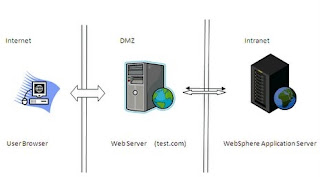 A wellknown topology for enterprise environment has three main logical zones.
1 Internet or Extranet(User)
2 De militarized Zone (a.k.a DMZ)
3 Intranet
These zones are seperated from each other by establishing firewall .
WebSphere Application server resides in side the intranet zone of company which is mostly secure and and web server resides in DMZ(De militarized Zone ). The internet user can access the application on the WAS only through web server.
The Websphere plug-in residing on the web server is responsible for delivering requests from web server to specific application on Websphere application server.
WebSphere plug-in has a knowledge of the server name and ports on which the the Websphere servers are listening.
The WebSphere plug-in is in memory module which works in sync with Web Server. WebSphere plug-in can be configured by updating plugin-cfg.xml residing on Web Server. Web Server forwards the requests to Websphere plug-in based on the server name and context roots.
Below suggests the typical configuration required to correctly work the request flow from web server to WAS for host name "test.com" which is listening on port 443,444 and 80 .
Step 1
Define a virtual host stanza in the httpd.conf for Web Server(Apache or IBM HTTP Server) file as below for server name "test.com" which will listen on port 443,444 and 80.
Listen 80
Listen 443
Listen 444
NameVirtualHost 10.12.4.14:443
NameVirtualHost 10.12.4.14:444
NameVirtualHost 10.12.4.14:80
<VirtualHost "10.12.4.14:443">
ServerName test.com
</VirtualHost>
<VirtualHost "10.12.4.14:80">
ServerName test.com
</VirtualHost>
<VirtualHost "10.12.4.14:444">
ServerName test.com
</VirtualHost>
step 2
Corresponding configuration in websphere plug-in config file should be set as below
<VirtualHostGroup Name="tesClusterHost" >
<VirtualHost Name="test.com:80"/>
<VirtualHost Name="test.com:443"/>
<VirtualHost Name="test.com:444"/>
</VirtualHostGroup>
Note: There will be entry per port on which webserver is listening for test.com.
step 3
The corresponding setting on Websphere Application Server on Virtual host will be
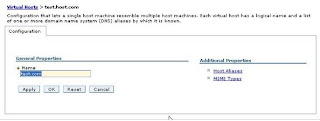
There will be always a one to one relation ship between port and server name defined in plug-in configuration file to "Host Aliases" defineded in VirtualHosts specific to application server or cluster member.
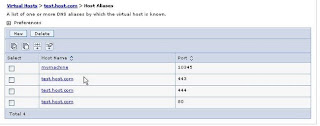
This completes the sample configuration for test.com
The url to access the was server will be
http://test.com/<context root> (Port 80)
https://test.com/<context root>(Port 443)
http://test.com:444/<context root>
There is a possibility of direct accessing the application on websphere server by passing webserver. But this is only possible in the intranet and based on the settings of the firewall.
If you want access the application directly from WebSphere application server then you can add a new "host alias" with machine name or IP address and port your want listen on like
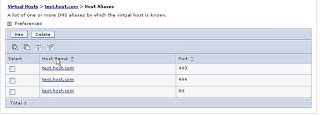
Then you can access the application directly from the Websphere application server but inside your intranet with url http://mymachine:10345/<application context root>/
NB: Minimize the user of * for defining the virtual hosts because they can very bad effect on forwarding the request and they are not easy to debug.
 A wellknown topology for enterprise environment has three main logical zones.
1 Internet or Extranet(User)
2 De militarized Zone (a.k.a DMZ)
3 Intranet
These zones are seperated from each other by establishing firewall .
WebSphere Application server resides in side the intranet zone of company which is mostly secure and and web server resides in DMZ(De militarized Zone ). The internet user can access the application on the WAS only through web server.
The Websphere plug-in residing on the web server is responsible for delivering requests from web server to specific application on Websphere application server.
WebSphere plug-in has a knowledge of the server name and ports on which the the Websphere servers are listening.
The WebSphere plug-in is in memory module which works in sync with Web Server. WebSphere plug-in can be configured by updating plugin-cfg.xml residing on Web Server. Web Server forwards the requests to Websphere plug-in based on the server name and context roots.
Below suggests the typical configuration required to correctly work the request flow from web server to WAS for host name "test.com" which is listening on port 443,444 and 80 .
Step 1
Define a virtual host stanza in the httpd.conf for Web Server(Apache or IBM HTTP Server) file as below for server name "test.com" which will listen on port 443,444 and 80.
Listen 80
Listen 443
Listen 444
NameVirtualHost 10.12.4.14:443
NameVirtualHost 10.12.4.14:444
NameVirtualHost 10.12.4.14:80
<VirtualHost "10.12.4.14:443">
ServerName test.com
</VirtualHost>
<VirtualHost "10.12.4.14:80">
ServerName test.com
</VirtualHost>
<VirtualHost "10.12.4.14:444">
ServerName test.com
</VirtualHost>
step 2
Corresponding configuration in websphere plug-in config file should be set as below
<VirtualHostGroup Name="tesClusterHost" >
<VirtualHost Name="test.com:80"/>
<VirtualHost Name="test.com:443"/>
<VirtualHost Name="test.com:444"/>
</VirtualHostGroup>
Note: There will be entry per port on which webserver is listening for test.com.
step 3
The corresponding setting on Websphere Application Server on Virtual host will be

There will be always a one to one relation ship between port and server name defined in plug-in configuration file to "Host Aliases" defineded in VirtualHosts specific to application server or cluster member.

This completes the sample configuration for test.com
The url to access the was server will be
http://test.com/<context root> (Port 80)
https://test.com/<context root>(Port 443)
http://test.com:444/<context root>
There is a possibility of direct accessing the application on websphere server by passing webserver. But this is only possible in the intranet and based on the settings of the firewall.
If you want access the application directly from WebSphere application server then you can add a new "host alias" with machine name or IP address and port your want listen on like

Then you can access the application directly from the Websphere application server but inside your intranet with url http://mymachine:10345/<application context root>/
NB: Minimize the user of * for defining the virtual hosts because they can very bad effect on forwarding the request and they are not easy to debug.
Thursday, October 2, 2008
HTTPS Requests in JMeter with JDK 1.6
Steps to make HTTPS requests work in JMeter as follows
1. Export your personal certificate in .cer format from browser. I exported my personal certificate in c:\temp-ankur.cer. Also you may need to import the root ceritifcate of you ceritificate provider(If provider is custom).Like in my case it was BBS.
2. Import the certificate in default cacerts file with following command
keytool -importcert -keystore C:/Programfiler/Java/jdk1.6.0/jre/lib/security/cacerts -storepass changeit -file c:\temp-ankur.cer
3. Import attached root certificate
keytool -importcert -v -keystore C:/Programfiler/Java/jdk1.6.0/jre/lib/security/cacerts -storepass changeit -file c:\cert-bbsid-root.der -alias BBS-ID
4. Modify the systems.properties file as follows
---------------------------------------------------------------------------------------------------
# SSL properties (moved from jmeter.properties)
# Location of the truststore (trusted certificates)
javax.net.ssl.trustStore=C:/Programfiler/Java/jdk1.6.0/jre/lib/security/cacerts
#javax.net.ssl.trustStoreType=PKCS12
# Location of the keystore
#javax.net.ssl.keyStore=c:/test/test.p12
#
#The password to your keystore
javax.net.ssl.keyStorePassword=changeit
--------------------------------------------------------------------------------------------------
If required we need to import all the certifcates from the server for your domain name. For this refer this link http://blogs.sun.com/andreas/entry/no_more_unable_to_find
5 javac InstallCert.java
6 java InstallCert www.xxx.no
Thats all !
Then you can start load test for the HTTPS URLs.
1. Export your personal certificate in .cer format from browser. I exported my personal certificate in c:\temp-ankur.cer. Also you may need to import the root ceritifcate of you ceritificate provider(If provider is custom).Like in my case it was BBS.
2. Import the certificate in default cacerts file with following command
keytool -importcert -keystore C:/Programfiler/Java/jdk1.6.0/jre/lib/security/cacerts -storepass changeit -file c:\temp-ankur.cer
3. Import attached root certificate
keytool -importcert -v -keystore C:/Programfiler/Java/jdk1.6.0/jre/lib/security/cacerts -storepass changeit -file c:\cert-bbsid-root.der -alias BBS-ID
4. Modify the systems.properties file as follows
---------------------------------------------------------------------------------------------------
# SSL properties (moved from jmeter.properties)
# Location of the truststore (trusted certificates)
javax.net.ssl.trustStore=C:/Programfiler/Java/jdk1.6.0/jre/lib/security/cacerts
#javax.net.ssl.trustStoreType=PKCS12
# Location of the keystore
#javax.net.ssl.keyStore=c:/test/test.p12
#
#The password to your keystore
javax.net.ssl.keyStorePassword=changeit
--------------------------------------------------------------------------------------------------
If required we need to import all the certifcates from the server for your domain name. For this refer this link http://blogs.sun.com/andreas/entry/no_more_unable_to_find
5 javac InstallCert.java
6 java InstallCert www.xxx.no
Thats all !
Then you can start load test for the HTTPS URLs.
Thursday, May 29, 2008
Problem with Struts Debugging
Problem Description:
I have developed simple application connects to the database, shows user the data in the table on JSP page.
Development Environment:
1. Eclipse Europa
2. Tomcat plug-in Eclipse Tomcat Launcher plugin Sysdeo(http://www.eclipsetotale.com/tomcatPlugin.html)
3. Tomcat 6.0.14(With JDK 1.5)
4. JDK 1.6 in eclipse.
The application was running quite fine in integrated environment with tomcat plugin and same tomcat.
I exported the project as a directory in the tomcat webapps directory and fired up the tomcat then I found following error in the/logs/localhost.xxx.log
SEVERE: Servlet /webserverinfo threw load() exception
javax.servlet.UnavailableException: Parsing error processing resource path jndi:/localhost/webserverinfo/WEB-INF/struts-config.xml at org.apache.struts.action.ActionServlet.handleConfigException(ActionServlet.java:761) at org.apache.struts.action.ActionServlet.parseModuleConfigFile(ActionServlet.java:744) at org.apache.struts.action.ActionServlet.initModuleConfig(ActionServlet.java:689) at org.apache.struts.action.ActionServlet.init(ActionServlet.java:356) at javax.servlet.GenericServlet.init(GenericServlet.java:212) at org.apache.catalina.core.StandardWrapper.loadServlet(StandardWrapper.java:1161) at org.apache.catalina.core.StandardWrapper.load(StandardWrapper.java:981) at org.apache.catalina.core.StandardContext.loadOnStartup(StandardContext.java:4045) at org.apache.catalina.core.StandardContext.start(StandardContext.java:4351) at org.apache.catalina.core.ContainerBase.start(ContainerBase.java:1045) at org.apache.catalina.core.StandardHost.start(StandardHost.java:719) at org.apache.catalina.core.ContainerBase.start(ContainerBase.java:1045) at org.apache.catalina.core.StandardEngine.start(StandardEngine.java:443) at org.apache.catalina.core.StandardService.start(StandardService.java:516) at org.apache.catalina.core.StandardServer.start(StandardServer.java:710) at org.apache.catalina.startup.Catalina.start(Catalina.java:566) at sun.reflect.NativeMethodAccessorImpl.invoke0(Native Method) at sun.reflect.NativeMethodAccessorImpl.invoke(NativeMethodAccessorImpl.java:39) at sun.reflect.DelegatingMethodAccessorImpl.invoke(DelegatingMethodAccessorImpl.java:25) at java.lang.reflect.Method.invoke(Method.java:585) at org.apache.catalina.startup.Bootstrap.start(Bootstrap.java:288) at org.apache.catalina.startup.Bootstrap.main(Bootstrap.java:413)
Solution:
· I referred all the google post for this problem . Everyone says this is problem related with struts-configuration file.
· I verified my struts-config.xml file and it was correct.
· The message from the exception provided above is generic and misleading too.
· I decided to enable debugging for tomcat and struts.
· To enable debugging for tomcat I modified file\conf\logging.
All the fine were replaced by ALL.
Enable the logging for struts by adding log4j.properties file\webapps\\WEB-INF\classes. The contents of the file are as follows.
-----------------------------------------------------------------------------------------------------------------------
log4j.rootLogger=ALL,stdout,R
log4j.appender.stdout=org.apache.log4j.ConsoleAppender
log4j.appender.stdout.layout=org.apache.log4j.PatternLayout
log4j.appender.stdout.layout.ConversionPattern=[%5p] %d{mm:ss} (%F:%M:%L)%n%m%n%n
log4j.appender.R=org.apache.log4j.RollingFileAppender
log4j.appender.R.layout=org.apache.log4j.PatternLayout
log4j.appender.R.layout.ConversionPattern=[%5p] %d{mm:ss} (%F:%M:%L)%n%m%n%n
log4j.appender.R.File=example.log
--------------------------------------------------------------------------------------------------------------------------------
Then I found in the example.log file the problem was related
java.lang.reflect.InvocationTargetException at sun.reflect.NativeMethodAccessorImpl.invoke0(Native Method) at sun.reflect.NativeMethodAccessorImpl.invoke(NativeMethodAccessorImpl.java:39) at sun.reflect.DelegatingMethodAccessorImpl.invoke(DelegatingMethodAccessorImpl.java:25) at java.lang.reflect.Method.invoke(Method.java:585)
.
.
Caused by: java.lang.UnsupportedClassVersionError: Bad version number in .class file at java.lang.ClassLoader.defineClass1(Native Method) at java.lang.ClassLoader.defineClass(ClassLoader.java:620) at java.security.SecureClassLoader.defineClass(SecureClassLoader.java:124) at org.apache.catalina.loader.WebappClassLoader.findClassInternal(WebappClassLoader.java:1817) at org.apache.catalina.loader.WebappClassLoader.findClass(WebappClassLoader.java:872) at org.apache.catalina.loader.WebappClassLoader.loadClass(WebappClassLoader.java:1325) at org.apache.catalina.loader.WebappClassLoader.loadClass(WebappClassLoader.java:1204) at org.apache.struts.config.FormBeanConfig.formBeanClass(FormBeanConfig.java:612) at org.apache.struts.config.FormBeanConfig.setType(FormBeanConfig.java:166).
Now the problem is clear. I was having compiled the application java file in JDK 1.6 and tomcat was running on JDK 1.5.
I wasted my 6 hours to get this.
Conclusion:
My reservations are that struts doesn’t show the correct message
My suggestion is if you are using STRUTS during development keep enabled the debug so that you won’t waste your time.
I have developed simple application connects to the database, shows user the data in the table on JSP page.
Development Environment:
1. Eclipse Europa
2. Tomcat plug-in Eclipse Tomcat Launcher plugin Sysdeo(http://www.eclipsetotale.com/tomcatPlugin.html)
3. Tomcat 6.0.14(With JDK 1.5)
4. JDK 1.6 in eclipse.
The application was running quite fine in integrated environment with tomcat plugin and same tomcat.
I exported the project as a directory in the tomcat webapps directory and fired up the tomcat then I found following error in the
SEVERE: Servlet /webserverinfo threw load() exception
javax.servlet.UnavailableException: Parsing error processing resource path jndi:/localhost/webserverinfo/WEB-INF/struts-config.xml at org.apache.struts.action.ActionServlet.handleConfigException(ActionServlet.java:761) at org.apache.struts.action.ActionServlet.parseModuleConfigFile(ActionServlet.java:744) at org.apache.struts.action.ActionServlet.initModuleConfig(ActionServlet.java:689) at org.apache.struts.action.ActionServlet.init(ActionServlet.java:356) at javax.servlet.GenericServlet.init(GenericServlet.java:212) at org.apache.catalina.core.StandardWrapper.loadServlet(StandardWrapper.java:1161) at org.apache.catalina.core.StandardWrapper.load(StandardWrapper.java:981) at org.apache.catalina.core.StandardContext.loadOnStartup(StandardContext.java:4045) at org.apache.catalina.core.StandardContext.start(StandardContext.java:4351) at org.apache.catalina.core.ContainerBase.start(ContainerBase.java:1045) at org.apache.catalina.core.StandardHost.start(StandardHost.java:719) at org.apache.catalina.core.ContainerBase.start(ContainerBase.java:1045) at org.apache.catalina.core.StandardEngine.start(StandardEngine.java:443) at org.apache.catalina.core.StandardService.start(StandardService.java:516) at org.apache.catalina.core.StandardServer.start(StandardServer.java:710) at org.apache.catalina.startup.Catalina.start(Catalina.java:566) at sun.reflect.NativeMethodAccessorImpl.invoke0(Native Method) at sun.reflect.NativeMethodAccessorImpl.invoke(NativeMethodAccessorImpl.java:39) at sun.reflect.DelegatingMethodAccessorImpl.invoke(DelegatingMethodAccessorImpl.java:25) at java.lang.reflect.Method.invoke(Method.java:585) at org.apache.catalina.startup.Bootstrap.start(Bootstrap.java:288) at org.apache.catalina.startup.Bootstrap.main(Bootstrap.java:413)
Solution:
· I referred all the google post for this problem . Everyone says this is problem related with struts-configuration file.
· I verified my struts-config.xml file and it was correct.
· The message from the exception provided above is generic and misleading too.
· I decided to enable debugging for tomcat and struts.
· To enable debugging for tomcat I modified file
All the fine were replaced by ALL.
Enable the logging for struts by adding log4j.properties file
-----------------------------------------------------------------------------------------------------------------------
log4j.rootLogger=ALL,stdout,R
log4j.appender.stdout=org.apache.log4j.ConsoleAppender
log4j.appender.stdout.layout=org.apache.log4j.PatternLayout
log4j.appender.stdout.layout.ConversionPattern=[%5p] %d{mm:ss} (%F:%M:%L)%n%m%n%n
log4j.appender.R=org.apache.log4j.RollingFileAppender
log4j.appender.R.layout=org.apache.log4j.PatternLayout
log4j.appender.R.layout.ConversionPattern=[%5p] %d{mm:ss} (%F:%M:%L)%n%m%n%n
log4j.appender.R.File=example.log
--------------------------------------------------------------------------------------------------------------------------------
Then I found in the example.log file the problem was related
java.lang.reflect.InvocationTargetException at sun.reflect.NativeMethodAccessorImpl.invoke0(Native Method) at sun.reflect.NativeMethodAccessorImpl.invoke(NativeMethodAccessorImpl.java:39) at sun.reflect.DelegatingMethodAccessorImpl.invoke(DelegatingMethodAccessorImpl.java:25) at java.lang.reflect.Method.invoke(Method.java:585)
.
.
Caused by: java.lang.UnsupportedClassVersionError: Bad version number in .class file at java.lang.ClassLoader.defineClass1(Native Method) at java.lang.ClassLoader.defineClass(ClassLoader.java:620) at java.security.SecureClassLoader.defineClass(SecureClassLoader.java:124) at org.apache.catalina.loader.WebappClassLoader.findClassInternal(WebappClassLoader.java:1817) at org.apache.catalina.loader.WebappClassLoader.findClass(WebappClassLoader.java:872) at org.apache.catalina.loader.WebappClassLoader.loadClass(WebappClassLoader.java:1325) at org.apache.catalina.loader.WebappClassLoader.loadClass(WebappClassLoader.java:1204) at org.apache.struts.config.FormBeanConfig.formBeanClass(FormBeanConfig.java:612) at org.apache.struts.config.FormBeanConfig.setType(FormBeanConfig.java:166).
Now the problem is clear. I was having compiled the application java file in JDK 1.6 and tomcat was running on JDK 1.5.
I wasted my 6 hours to get this.
Conclusion:
My reservations are that struts doesn’t show the correct message
My suggestion is if you are using STRUTS during development keep enabled the debug so that you won’t waste your time.
Monday, March 17, 2008
Setting SSL communcation in JMeter
Select the client certificate you want to export. export it in term .pcks12 from brower n. remember the password used for the keystore
Now rename the certificate with extension as “.p12” other wise the certificate business will not work in JMeter . This is necessary requirement.
Download the latest Jakarta JMeter version from internet.
Modify the system.properties file with javax.net.ssl.keyStore and javax.net.ssl.keyStorePassword to proportionate.
# Location of the keystore
javax.net.ssl.keyStore=c:/test/test.p12
#
#The password to your keystore
javax.net.ssl.keyStorePassword=pepsi123
This is all the setting to do an ssl communication in JMeter.
Now rename the certificate with extension as “.p12” other wise the certificate business will not work in JMeter . This is necessary requirement.
Download the latest Jakarta JMeter version from internet.
Modify the system.properties file with javax.net.ssl.keyStore and javax.net.ssl.keyStorePassword to proportionate.
# Location of the keystore
javax.net.ssl.keyStore=c:/test/test.p12
#
#The password to your keystore
javax.net.ssl.keyStorePassword=pepsi123
This is all the setting to do an ssl communication in JMeter.
Tuesday, October 9, 2007
curl utility
This is the best utility I have used on linux to access the webpages from command line. You can do the ssl connection from command line.
I feel this is best and useful tool for writting regressation tests. You can enable the proxy also.
curl -x proxyserver:port -c
http://curl.haxx.se/
Try it sometime
I feel this is best and useful tool for writting regressation tests. You can enable the proxy also.
curl -x proxyserver:port -c
http://curl.haxx.se/
Try it sometime
Java Debugging Tool jdb
Today I came across java debugging tool jdb.
http://java.sun.com/j2se/1.4.2/docs/tooldocs/solaris/jdb.html
Its nice tool to debug the java code from command line. You can debug the code step by step.Also in multiple steps. Along with that you can traverse thr' code if it available with you.
Nice tool !
http://java.sun.com/j2se/1.4.2/docs/tooldocs/solaris/jdb.html
Its nice tool to debug the java code from command line. You can debug the code step by step.Also in multiple steps. Along with that you can traverse thr' code if it available with you.
Nice tool !
Subscribe to:
Posts (Atom)